
 |
Following the study plan for SBI PO Preliminary Examination 2018, the first week starts with practice questions on Simplification, Bar Graph DI, and More Questions Set. To ensure proper preparation of the section we advise you to go through all the questions sincerely and try to attempt each one of them. Afterward, match your solutions and the approach with the one that would be provided later. Practice more and more questions on the same section to enhance your grip over the topics. Following is the Quantitative Aptitude quiz to help you practice with the best of latest pattern questions.
(a) 4,000
(b) 4,500
(c) 5,000
(d) 6,000
(e) 5,500
Q2. Train A starts its journey from Puri to New Delhi while train B starts from New Delhi to Puri. After crossing each other they finish their journey in 81 hours and 121 hours respectively. Then what will be speed of train B if train A speed is 44 km/h?
(a) 44 km/h
(b) 55 km/h
(c) 36 km/h
(d) 46 km/h
(e) 64 km/h
Q3. Sushil fires two bullets from the same place at an interval of 15 minutes but Rishabh sitting in a bus approaching the place hears the second sound 14 minutes 30 seconds after the first. What is the approximate speed of bus (if sound travels at the speed of 330 meter per second)?
(a) 330/23 m/sec
(b) 330/29 m/sec
(c) 330/27 m/sec
(d) 330/31 m/sec
(e) None of the above
Q4. In a circus there was a deer and a lion walking in two different rings of same radii. There I observed that when deer moved 3 steps, lion moved 5 steps in the same time, but the distance traversed by deer in 5 steps in equal to the distance traversed by lion in 4 steps. What is the number of rounds that a deer made when lion completed 100 rounds
(a) 120
(b) 48
(c) 75
(d) 80
(e) 72
Q5. Shatabdi Express crosses a platform and a bridge in 18 and 32 seconds respectively. The speed of the train and length of the train are 45 kmph and 140 metres respectively. Find the length of platform is approximately what percent less than the length of bridge?
(a) 72%
(b) 67%
(c) 82%
(d) 61%
(e) 51 %
Direction (6-10): Study the following graph carefully & answer the questions that follows:
Production of t-shirts by different companies in three consecutive years (in lakh)
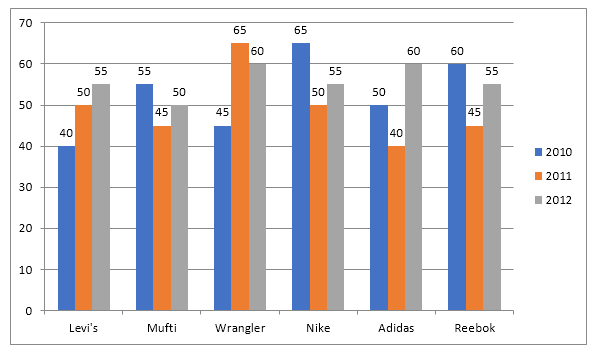
Q6. What is approximate difference between average production of the 6 companies in 2010 and average production of same companies in 2012?
(a) 3.3 lakh
(b) 5 lakh
(c) 5.5 lakh
(d) 4.5 lakh
(e) 4 lakh
Q7. What is percentage increase production by company Levi’s from 2010 to 2011?
(a) 35%
(b) 102/13%
(c) 25%
(d) 20%
(e) 128/13%
Q8. Which of following companies recorded the maximum percentage growth from 2010 to 2012?
(a) Levi’s
(b) Nike
(c) Adidas
(d) Wrangler
(e) Mufti
Q9. Production of company Adidas in 2010 & production of company Wrangler in 2012 together is what percent of production of company Nike in 2011?
(a) 120 %
(b) 220 %
(c) 200 %
(d) 150 %
(e) 250 %
Q10. What is the ratio of production of company Mufti in 2011 and company Wrangler in 2010 together to the company Nike and Reebok in year 2012 together?
(a) 11 : 7
(b) 2 : 5
(c) 7 : 11
(d) 11 : 9
(e) 9 : 11
Directions (11-15): What will come in place of the question mark (?) in the following questions?
Q11. √(360-225×2+379) = ?
(a) 17
(b) 19
(c) 279
(d) 289
(e) 269
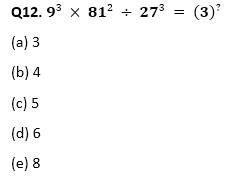
Q13. 572 ÷ 26 × 12 – 200 = (2)^?
(a) 5
(b) 6
(c) 7
(d) 8
(e) 10
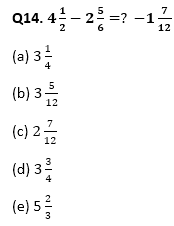
Q15. 36% of 245 – 40% of 210 = 10 –?
(a) 4.2
(b) 6.8
(c) 4.9
(d) 5.6
(e) 5.8












 SBI PO Quantitative Aptitude 2026, Impor...
 Simple Interest Questions for Bank Exams
 Probability Questions for Bank Exams