
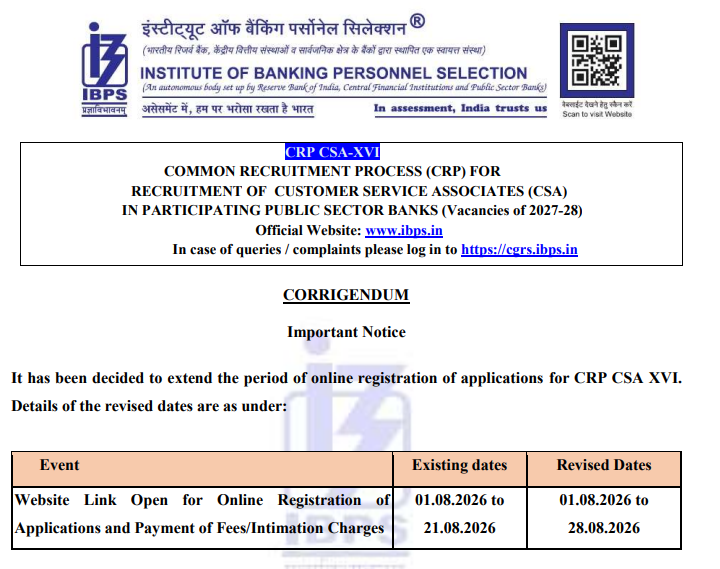
IBPS Clerk aspirants, there is an important update if you were waiting to apply or complete your application. The IBPS Clerk Notification 2026 has been released for 11,403 Customer Service Associate (CSA) vacancies under CRP CSA-XVI, and the application deadline has now been extended till 28 August 2026. This extension gives eligible candidates additional time to complete their registration, upload the required documents and pay the application fee.
If you have not applied yet, make sure you use the revised deadline rather than waiting until the last day.
IBPS Clerk Notification 2026, Last Date Extended
The IBPS Clerk online application process was initially scheduled to close earlier, but IBPS has now extended the last date to 28 August 2026, providing candidates with additional time to complete the registration process. Candidates who are eligible and have not yet submitted their applications should carefully fill in the required details, upload the prescribed documents and complete the fee payment within the revised application window.
IBPS Clerk Notification 2026: Overview
The IBPS Clerk Recruitment 2026 offers graduates an opportunity to secure a clerical position in leading public sector banks across India. Selected candidates will be appointed as Customer Service Associates, responsible for handling customer transactions, account services, cash operations, passbook updates, digital banking support, and other day-to-day banking activities.
| Particular | Details |
|---|---|
| Organization | Institute of Banking Personnel Selection (IBPS) |
| Post Name | Customer Service Associate (CSA) |
| Popular Name | IBPS Clerk 2026 |
| Recruitment Process | CRP CSA-XVI |
| Application Mode | Online |
| Registration Dates | 1 August – 28 August 2026 |
| Selection Process | Preliminary Exam, Main Exam, LLPT, Document Verification & Medical Examination |
| Official Website | www.ibps.in |
IBPS Clerk Notification 2026 PDF
The IBPS Clerk Notification 2026 (CRP CSA-XVI) has been released for recruitment to the Customer Service Associate (CSA) post in participating Public Sector Banks. As per the notification, candidates who meet the prescribed educational qualification, age limit, and other eligibility conditions can apply for the recruitment through the online application process. The notification contains complete details regarding vacancies, eligibility, selection process, exam pattern, application procedure, and other important instructions.
IBPS Clerk Notification 2026 PDF
IBPS Clerk Exam Date 2026
According to the official notification, the tentative examination schedule is as follows:
- Preliminary Examination: 10 & 11 October 2026
- Main Examination: 27 December 2026
IBPS Clerk Important Dates
| Event | Date |
| Notification Release | 1 August 2026 |
| Online Registration Starts | 1 August 2026 |
| Last Date to Apply | 28 August 2026 |
| Fee Payment | 1–28 August 2026 |
| Application Correction Window | Two days after registration closes |
| Pre-Examination Training | September 2026 |
| Preliminary Admit Card | September 2026 |
| Preliminary Exam | 10 & 11 October 2026 |
| Preliminary Result | 27 December 2026 |
| Main Admit Card | October/November 2026 |
| Main Examination | November 2026 |
IBPS Clerk Vacancy 2026
The official notification states that vacancies are indicative and subject to change depending on the requirements of participating public sector banks. State-wise and category-wise vacancies have been published in the notification.
Bank-wise Vacancies
The table below shows the number of Customer Service Associate (CSA) vacancies announced by each participating public sector bank under the IBPS Clerk Recruitment 2026.
| Participating Bank | Number of Vacancies |
| Bank of Baroda | 2,500 |
| Bank of India | 1,050 |
| Bank of Maharashtra | 1,000 |
| Canara Bank | 1,000 |
| Central Bank of India | 2,000 |
| Indian Bank | Not Reported |
| Indian Overseas Bank | 450 |
| Punjab National Bank | 2,000 |
| Punjab & Sind Bank | 358 |
| UCO Bank | 550 |
| Union Bank of India | 495 |
| Total | 11,403 |
Note: Indian Bank has not reported vacancies under the current notification. The vacancy position may change depending on the bank’s requirement
IBPS Clerk State-wise Vacancy 2026
The following table presents the state/UT-wise vacancies for IBPS Clerk (Customer Service Associate) Recruitment 2026.
| State / UT | Vacancies |
| Andaman & Nicobar | 13 |
| Andhra Pradesh | 367 |
| Arunachal Pradesh | 22 |
| Assam | 204 |
| Bihar | 308 |
| Chandigarh | 63 |
| Chhattisgarh | 214 |
| Dadra & Nagar Haveli & Daman & Diu | 35 |
| Delhi (NCT) | 416 |
| Goa | 87 |
| Gujarat | 753 |
| Haryana | 144 |
| Himachal Pradesh | 114 |
| Jammu & Kashmir | 61 |
| Jharkhand | 106 |
| Karnataka | 1,170 |
| Kerala | 330 |
| Ladakh | 05 |
| Lakshadweep | 07 |
| Madhya Pradesh | 601 |
| Maharashtra | 956 |
| Manipur | 31 |
| Meghalaya | 18 |
| Mizoram | 28 |
| Nagaland | 27 |
| Odisha | 249 |
| Puducherry | 19 |
| Punjab | 276 |
| Rajasthan | 328 |
| Sikkim | 20 |
| Tamil Nadu | 894 |
| Telangana | 261 |
| Tripura | 32 |
| Uttar Pradesh | 1,315 |
| Uttarakhand | 102 |
| West Bengal | 540 |
| Total | 11,403 |
Eligibility Criteria
Candidates must satisfy all eligibility conditions prescribed in the official notification before applying.
Educational Qualification
As per the notification:
- A Bachelor’s degree in any discipline from a recognized university or an equivalent qualification recognized by the Central Government.
- The graduation result must have been declared on or before 21 August 2026.
- Candidates must possess valid mark sheets or degree certificates during registration.
- Computer literacy is mandatory. Candidates should either possess a certificate/diploma/degree in computer operations or have studied computer/IT as a subject in school or college.
- Candidates must be proficient in the local language of the State/UT for which they are applying.
Age Limit
Candidates must satisfy the prescribed age criteria mentioned in the official notification. Age relaxation for reserved categories will be applicable as per Government of India guidelines.
Nationality
A candidate must be:
- A citizen of India, or
- A subject of Nepal or Bhutan, or
- A Tibetan refugee meeting the prescribed conditions, or
- A person of Indian origin who has migrated from specified countries with the necessary eligibility certificate.
IBPS Clerk Online Registration Link
The IBPS Clerk Online Registration Link 2026 is available on the official IBPS portal for eligible candidates. Applicants can use the link to complete registration, enter their details, upload the required documents, pay the prescribed application fee, and submit the application form online.
How to Apply for IBPS Clerk 2026?
Candidates can complete the application process by following these steps:
- Visit the official IBPS website.
- Click on CRP CSA-XVI Registration.
- Register using a valid email ID and mobile number.
- Fill in personal, educational, and communication details.
- Upload all required documents in the prescribed format.
- Preview the application carefully.
- Pay the application fee online.
- Submit the application form.
- Download and print the confirmation page.
Application Fee
Application fees are to be paid online during registration. The fee structure for different categories is mentioned in the official notification.
Selection Process
The IBPS Clerk 2026 selection process consists of the following stages:
- Preliminary Online Examination
- Main Online Examination
- Local Language Proficiency Test (LLPT)
- Document Verification
- Medical Examination
- Provisional Allotment
IBPS Clerk Salary 2026
The IBPS Clerk Salary 2026 offers an attractive pay package along with excellent career growth. The starting basic pay is ₹24,050, while the in-hand salary ranges between ₹34,000 and ₹38,000 per month depending on the place of posting. In addition to the basic pay, employees receive Dearness Allowance (DA), House Rent Allowance (HRA), Special Allowance, Transport Allowance, medical benefits, and annual increments.
Why Is IBPS Clerk a Great Opportunity?
IBPS Clerk remains one of India’s most sought-after banking examinations because of its job stability, attractive salary, career growth, and work-life balance. Some major advantages include:
- Opportunity to work in leading public sector banks.
- Attractive salary with allowances and annual increments.
- Job security under the public sector banking system.
- Promotion opportunities to Officer Scale positions through internal examinations.
- Exposure to modern banking technologies and customer service operations.
- Fixed working hours with public holidays and additional employee benefits.




 RBI Grade B Mains and Final Cut Off 2026...
 SBI SCO Notification 2026 Out for 6 Spec...
 Cyclone Arnab Explained: What Is It, Who...