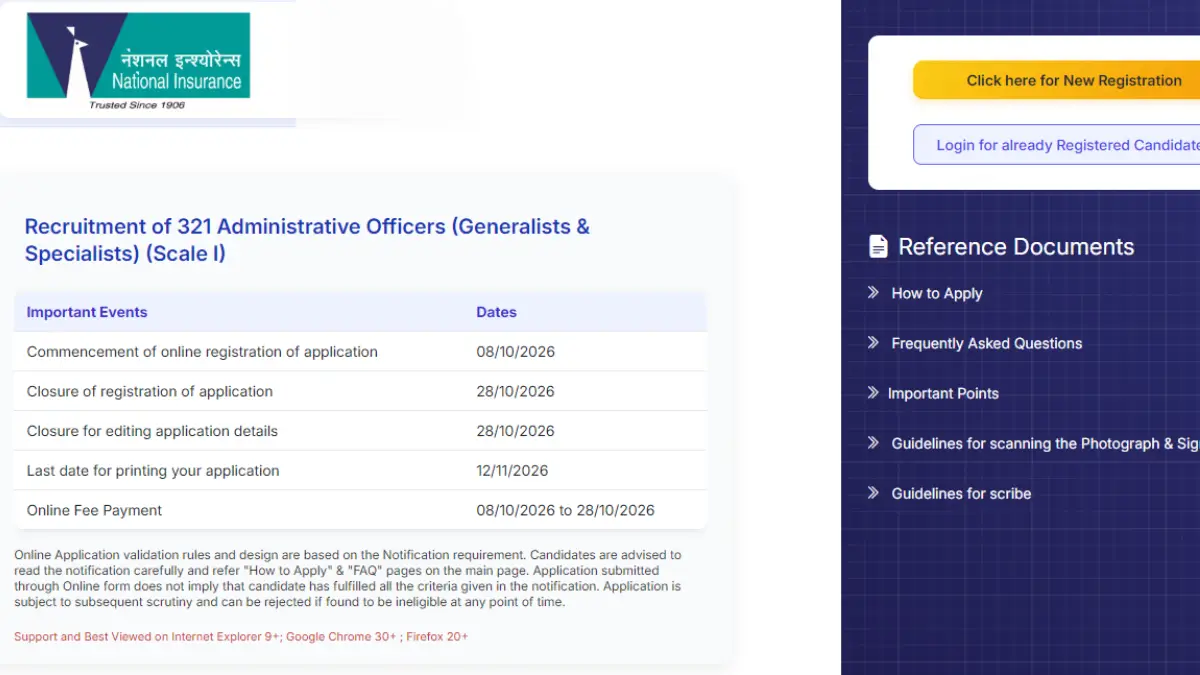
The NICL AO Apply Online 2026 process is underway for 321 Administrative Officer (Scale I) vacancies, including 200 Generalist and 121 Specialist posts. Eligible candidates can submit their applications online through the authorised registration portal. The application fee is ₹1,000 for candidates other than SC/ST/PwBD and ₹250 for SC/ST/PwBD candidates.
NICL AO Apply Online 2026
Applicants must complete the application form, upload the required documents, capture their photograph as instructed and pay the applicable fee to submit the NICL AO Application Form 2026 successfully. Only 2 days are left to apply, as the last date is 28 October 2026. Candidates should complete the process before the deadline to avoid last-minute technical issues.
NICL Administrative Officer Apply Online 2026 Overview
Candidates interested in the NICL Administrative Officer Recruitment 2026 can check the key details, including vacancies, application dates, fees, and examination schedule, in the overview table below.
| Particulars | Details |
| Organization | National Insurance Company Limited (NICL) |
| Exam Name | NICL AO Recruitment 2026 |
| Post Name | Administrative Officer (Scale I) |
| Total Vacancies | 321 |
| Generalist Posts | 200 |
| Specialist Posts | 121 |
| Application Mode | Online |
| Last Date to Apply | 28 October 2026 |
| Application Fee (SC/ST/PwBD) | ₹250 |
| Application Fee (Other Categories) | ₹1,000 |
| Phase I Exam Date | 17 November 2026 |
| Phase II Exam Date | 22 December 2026 |
| Official Website | nationalinsurance.nic.co.in |
NICL AO Apply Online 2026 Link
The NICL AO application process is online, allowing eligible candidates to complete their registration through the designated portal. Applicants should carefully follow the instructions provided on the website when entering their details and submitting the form. To simplify the process a direct application link is provided below.
NICL AO 2026: Click here to Apply
Documents Required Before NICL AO Registration
Candidates should keep the required scanned documents ready before beginning the online application.
- Recent passport-size colour photograph
- Signature on white paper using black ink
- Left thumb impression on white paper using black or blue ink
- Handwritten declaration in English using black ink
- Valid personal email ID
- Active mobile number
- Necessary details and documents required for online fee payment
Also Read, Major Changes In NICL AO 2026
NICL AO Photo and Document Upload Specifications
Incorrect file size, dimensions, format, or placement of the photograph and signature can create problems during the application process and may affect admission to the examination.
| Document | Specifications |
| Photograph |
4.5 cm × 3.5 cm; 200 × 230 pixels preferred; 20–50 KB
|
| Signature |
140 × 60 pixels preferred; 10–20 KB
|
| Left Thumb Impression |
240 × 240 pixels at 200 DPI preferred; 20–50 KB
|
| Handwritten Declaration |
800 × 400 pixels at 200 DPI preferred; 50–100 KB
|
| File Format | JPG/JPEG |
NICL AO Handwritten Declaration 2026
Candidates must write the following declaration in their own handwriting on white paper using black ink:
“I, ___________ (Name of the candidate), hereby declare that all information submitted by me in the application form is correct, true and valid. I will present the supporting documents as and when required.”
- The declaration must be written in English and should not be in capital letters. If it is written and uploaded by another person or in a language other than English, the application will be considered invalid.
- Visually impaired candidates who cannot write may have the declaration typed and place their left thumb impression below it, as permitted in the official notification.
NICL AO Live Photograph Requirement
Apart from the scanned photograph, candidates will also have to capture and upload a live photograph during the application process. The live photograph can be captured using a webcam or through a mobile phone by scanning the QR code provided in the application system.
How to Apply Online for NICL AO 2026?
Candidates can follow the steps below to complete the NICL AO 2026 online application.
- Visit the official NICL website and go to the Recruitment section.
- Click on “APPLY ONLINE” for NICL AO 2026.
- Select “Click here for New Registration.”
- Enter the candidate’s name, contact details, and email ID.
- A Provisional Registration Number and Password will be generated.
- Note down the registration number and password for future use.
- The registration details will also be sent through email and SMS.
- Fill in the required details in the application form.
- Use the “SAVE AND NEXT” option if the application cannot be completed in one sitting.
- Upload the photograph, signature, left thumb impression, and handwritten declaration as per the prescribed specifications.
- Fill in the remaining details of the application form.
- Use the Preview option to check all details carefully.
- Make corrections, if required, before clicking “COMPLETE REGISTRATION.”
- Proceed to the “PAYMENT” tab.
- Pay the applicable application fee through the available online payment options.
- Click “SUBMIT” after successful payment and completion of the application.
NICL AO 2026 Application Fee
The application fee for NICL AO 2026 varies according to the candidate’s category. The fee has to be paid online during the registration process and is non-refundable.
- SC/ST/PwBD: ₹250/-
- All candidates other than SC/ST/PwBD: ₹1,000/-
Common Errors While Filling NICL AO Application Form 2026
Candidates may encounter technical issues while completing the NICL AO online application. Checking the details below can help prevent common mistakes.
- Photograph or signature rejected: Check the prescribed file size, dimensions, format and image clarity before uploading.
- Live photograph not working: Allow camera access, check the lighting and follow the instructions provided on the application portal.
- OTP not received: Verify the registered mobile number or email address and check the spam folder before requesting another OTP.
- Payment failure: Check the transaction status before attempting payment again. If the amount has been debited without confirmation, follow the portal’s instructions.
- Incorrect application details: Review all entries carefully before completing registration. Do not assume that corrections will be permitted after final submission.
- Registration details misplaced: Check the registration email or SMS and use the recovery option available on the application portal.
How to Check NICL AO Application Status 2026?
Candidates can verify their NICL AO 2026 application and payment confirmation through the official application portal.
1. Visit the NICL AO application portal.
2. Log in using the required registration credentials, if available.
3. Check the application submission and fee payment confirmation.
4. Save or print the submitted application form and payment receipt.
NICL AO Application Form 2026: Can You Edit Details After Final Submission?
Candidates should carefully review all the information entered in the NICL AO Application Form 2026 before completing the final submission. Once the application is finally submitted, editing or correcting the details may not be permitted through the online portal.
- Before final submission: Candidates should use the Preview option to check their personal details, educational qualifications, uploaded documents and other information.
- After final submission: Candidates should check the official notification and application portal for any correction facility announced by NICL.
- Incorrect details: If any mistake is noticed after submission, candidates should contact the official recruitment helpdesk for guidance, where necessary.
- Payment-related issues: Candidates should verify their payment status before attempting another transaction to avoid duplicate payments.
| Related Article | |
| NICL AO Salary | NICL AO Syllabus |
| NICL AO Previous Year Paper | NICL AO Cut Off |






 NABARD Grade A Salary 2026, Salary Struc...
 Daily Current Affairs and GK Updates (27...
 Decode Your Personality Type for SBI PO ...