
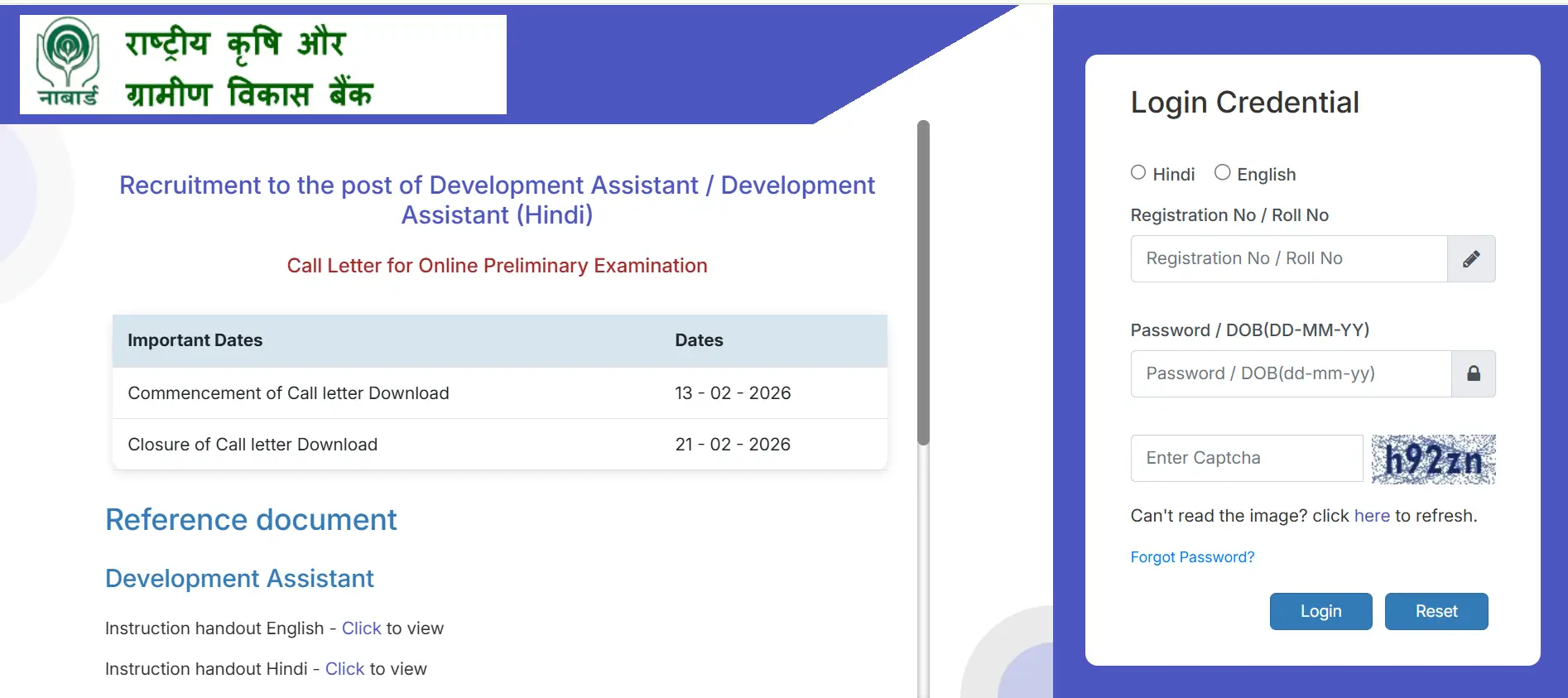
The National Bank for Agriculture and Rural Development has officially issued the NABARD Development Assistant Admit Card 2026. Aspirants who applied for the 162 available DA positions can now access and download their admit cards online. The NABARD Development Assistant exam is set to take place on 21 February 2026.
NABARD Development Assistant Admit Card 2026 Out
The National Bank for Agriculture and Rural Development Development Assistant Prelims Admit Card 2026 is mandatory for entry into the exam hall. Candidates must bring it along with a valid photo ID, as no one will be allowed inside without these. Those preparing for the exam should now concentrate on last‑minute revisions while checking that all information on their admit card is accurate.
| NABARD DA Admit Card 2026 | |
| Organization | National Bank for Agriculture and Rural Development (NABARD) |
| Post | Development Assistant |
| Vacancies | 162 |
| Category | Admit Card |
| Status | Released |
| Exam Date | 21 February 2026 |
| Login Credentials | Registration Number/ Roll Number Password/ Date of Birth |
| Selection Process | Preliminary & Mains Exam |
| Official Website | www.nabard.org |
NABARD Development Assistant Prelims Admit Card 2026 Download Link
Candidates can now download their National Bank for Agriculture and Rural Development Development Assistant Admit Card 2026, as the official link is live and will stay active until the day of the exam. Make sure to have your registration credentials or date of birth ready for a hassle-free download. Use the official portal’s direct link provided below to access your admit card.
NABARD Development Assistant Admit Card 2026: Click Here to Download
Are You Appearing For NABARD DA Prelims Exam 2026??
NABARD Development Assistant Mock Test 2026
With the NABARD DA Admit Card 2026 now released, this is the perfect time to boost the final preparation with mock tests. Attempting the NABARD Development Assistant Mock Test 2026 will help understand the strengths and weaknesses, improve speed and accuracy before the actual exam. Practice in a real exam like environment, anlayze the performance, and plan the strategy to maximize the score on the exam day.

How to Download NABARD DA Call Letter 2026?
Candidates can download the NABARD Admit Card for the Development Assistant Prelims Exam by following these simple steps:
- Step 1: Visit the official NABARD website at www.nabard.org
- Step 2: Navigate to the ‘Recruitment’ or ‘Career’ section on the homepage
- Step 3: Click on the link that reads “Download Admit Card for Development Assistant Recruitment 2026”
- Step 4: Enter your registration number/application number and password/date of birth as required
- Step 5: Click on the ‘Submit’ button to access your admit card
- Step 6: The NABARD DA admit card 2026 will appear on the screen
- Step 7: Verify all the details mentioned on the admit card carefully
- Step 8: Download the admit card and take multiple printouts for future reference
Details Mentioned on NABARD Development Assistant Admit Card 2026
The NABARD Prelims Admit Card 2026 for the Development Assistant Exam contains the following important information that candidates must verify immediately after downloading:
- Candidate’s name and photograph
- Registration/Application number
- Date of birth and category
- Examination date and time
- Reporting time at the examination centre
- Examination centre name, address, and venue code
- Examination shift (if applicable)
- Important instructions for candidates
What to Do If You Can’t Download the Admit Card?
If you are unable to download your NABARD Development Assistant Admit Card 2026:
- Double-check your registration number and date of birth.
- Clear your browser cache and try again.
- Try downloading using a different device or browser.
- If the problem persists, contact the NABARD helpdesk immediately.
NABARD Development Assistant Shift Timing 2026
The National Bank for Agriculture and Rural Development Development Assistant exam will be conducted in two shifts: Shift 1 is scheduled from 9:00 AM to 10:00 AM, with entry starting at 8:00 AM, while Shift 2 will run from 11:30 AM to 12:30 AM, with entry beginning at 10:30 AM.
NABARD Development Assistant Prelims Exam Analysis 2026, 21st February 2026 Shift 1
NABARD DA Shift 2 Exam Analysis 2026, 21st February
NABARD Development Assistant 2026 Exam Pattern
The NABARD Development Assistant Prelims Exam 2026 is an online objective test. The exam has a total of 100 questions, and each question carries 1 mark, making the paper 100 marks in total. The question paper is available in English and Hindi. For every wrong answer, 0.25 marks will be deducted. The total exam duration is 60 minutes, and each section has a fixed time limit.
| NABARD Development Assistant Prelims Exam Pattern 2026 | |||
| Section | No. of Questions | Marks | Time |
| English Language | 40 | 40 | 20 minutes |
| Quantitative Aptitude | 30 | 30 | 20 minutes |
| Reasoning Ability | 30 | 30 | 20 minutes |
| Total | 100 | 100 | 60 minutes |
| NABARD Development Assistant (Hindi) Prelims Exam Pattern 2026 |
|||
| Section | No. of Questions | Marks | Time |
| English Language | 40 | 40 | 20 minutes |
| Professional Knowledge (Hindi/English) | 30 | 30 | 20 minutes |
| Reasoning Ability | 30 | 30 | 20 minutes |
| Total | 100 | 100 | 60 minutes |
How to Retrieve Registration Number if forgotten to Download NABARD DA Admit Card 2026
If you are the candidate who by any case lost or forgotten their Registration number which is used in downloading the NABARD DA Admit Card 2026, should follow the undermentioned types to get it back:
- Before resetting it, check your email or SMS for the registration confirmation message.
- Visit the NABARD website and then click on the “Forgot Registration Number.”
- Check you saved application form or printout.
- If not found, then at last contact the IBPS helpdesk.
Important Instructions for NABARD DA 2026 Exam
Candidates appearing for the NABARD Development Assistant examination must follow these important guidelines:
Before the Exam:
- Download and verify all details on the admit card
- Plan your route to the examination centre in advance
- Keep all required documents ready the night before
On Exam Day:
- Report to the examination centre well before the reporting time mentioned on the admit card
- Late entry after the gate closure time will not be allowed under any circumstances
- Carry a transparent water bottle if needed
- Do not carry any prohibited items such as mobile phones, calculators, smartwatches, Bluetooth devices, or any electronic gadgets
During the Exam:
- Follow all instructions given by the examination authorities
- Use only the rough sheets provided at the centre
- Do not indulge in any unfair practices or misconduct
- Biometric verification and photograph capture will be conducted before the examination
| Related Posts | |
| NABARD Development Assistant Syllabus | NABARD Development Assistant Cut Off |
| NABARD Development Assistant Previous Year Papers | NABARD Development Assistant Salary |

 IBPS Deputy Manager Admit Card 2026 Out,...
 SBI CBO Admit Card 2026 Out at sbi.co.in...
 LIC AAO Interview Call Letter 2026 Out a...