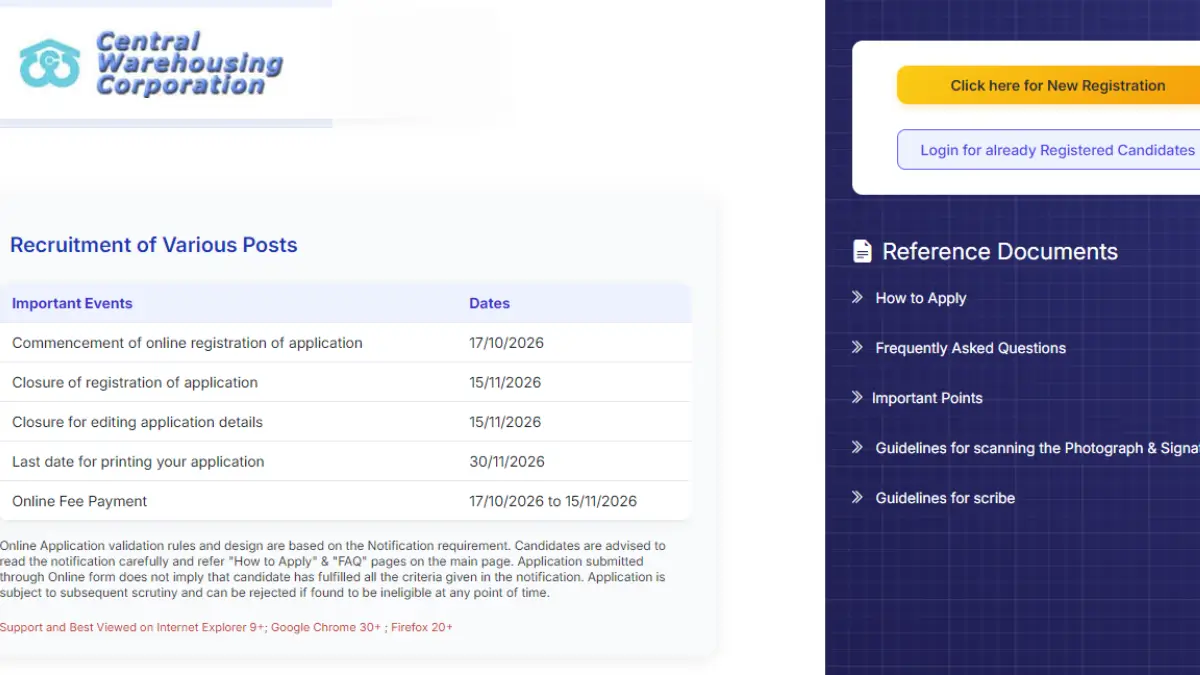
The Central Warehousing Corporation has activated the CWC Apply Online 2026 link for 327 vacancies of Assistant Manager and Junior Executive. Eligible candidates can apply for posts in General, Technical, Finance and Engineering disciplines through the official website from 17 October to 15 November 2026.
CWC Apply Online 2026 Active
Candidates must complete the CWC Recruitment 2026 online registration, fill in the required details, upload the necessary documents and pay the applicable application fee. Before submitting the form, applicants should verify all the information carefully. The direct application link, fee details and step-by-step instructions are provided below.
CWC Apply Online 2026 Link
The online application facility for CWC Recruitment 2026 allows aspirants to apply for their preferred posts through a single registration process. Applicants should ensure that all required details are entered correctly and the prescribed documents are uploaded in the specified format. The application process, including fee payment, must be completed before 15 November 2026 (11:59 PM) to avoid missing the deadline.
CWC Apply Online 2026: Click here to Apply Online
Documents Required for CWC Online Application 2026
Before starting the registration process, candidates should prepare the required scanned documents and keep their personal contact details active.
| Document/Requirement | Instructions |
| Photograph | Recent passport-style colour photograph against a light-coloured, preferably white, background |
| Live Photograph | Must be captured and uploaded using the webcam or mobile phone facility provided in the application |
| Signature | Sign on white paper using black ink; signatures in capital letters are not accepted |
| Left Thumb Impression | Use black or blue ink on white paper; if the left thumb is unavailable, the right thumb may be used |
| Handwritten Declaration | Must be written by the candidate in English using black ink on white paper |
| Personal Email ID | Must remain active throughout the recruitment process |
| Mobile Number | Must remain active for registration messages and recruitment communications |
| Payment Details | Keep a suitable online payment method ready |
Photograph, Signature and Document Specifications
Candidates must follow the specifications in the notification’s document-upload guidelines.
| Document | Preferred Dimensions | File Size |
| Photograph | 200 × 230 pixels | 20–50 KB |
| Signature | 140 × 60 pixels | 10–20 KB |
| Left Thumb Impression | 240 × 240 pixels at 200 DPI | 20–50 KB |
| Handwritten Declaration | 800 × 400 pixels at 200 DPI | 50–100 KB |
Handwritten Declaration Text
The handwritten declaration must be written by the candidate in English. The prescribed text is:
“I,_____________(Name of the candidate), hereby declare that all the information submitted by me in the application form is correct, true and valid. I will present the supporting documents as and when required.”
CWC Application Form Correction 2026
Candidates should verify their CWC Recruitment 2026 application forms carefully before final submission to avoid errors that could affect their candidature. The following points should be considered while filling out the application:
- Personal Details: Check your name, date of birth and contact information.
- Educational Details: Verify qualifications, passing year and other academic information.
- Category Details: Ensure the correct category is selected.
- Document Uploads: Check the photograph, signature and handwritten declaration.
- Final Submission: Review the complete form before submitting, as changes may not be allowed afterward.
How to Apply Online for CWC Recruitment 2026?
Candidates can follow these steps to complete the CWC online application form.
- Visit the official website: Open cewacor.nic.in.
- Open the recruitment section: Click on “Career @CWC (Direct Recruitment)-2026”.
- Select the application link: Click on “CLICK HERE TO APPLY ONLINE FOR ADVERTISEMENT NO. 2026/01”.
- Start new registration: Select “Click here for New Registration” and enter your name, contact details and email ID.
- Save the registration credentials: The system will generate a Provisional Registration Number and Password. Note them down; they will also be sent by email and SMS.
- Fill in the application form: Enter personal details, educational qualifications, category, experience where applicable, and other required information.
- Save and verify the details: Use the “Save and Next” option if you need to complete the form later. Verify all entries before proceeding.
- Upload the documents: Upload the photograph, signature, left thumb impression and handwritten declaration according to the prescribed specifications. Complete the live photograph capture as instructed.
- Preview the application: Check all the details and uploaded files before clicking “Complete Registration”.
- Pay the application fee: Open the Payment section and pay the applicable fee and intimation charges through the online payment gateway.
- Submit the application: Complete the payment process and wait for confirmation from the server. Do not press the Back or Refresh button while the transaction is being processed.
- Download and print the form: Save the e-receipt and print the system-generated application form containing the fee details.
CWC Application Fee 2026
Candidates must pay the prescribed application fee and intimation charges online. The fee is non-refundable, and applicable payment gateway charges must be borne by the candidate.
| Category of Candidates | Application Fee | Intimation Charges | Total |
| SC, ST, PwBD, Ex-Servicemen and Women candidates | Nil | ₹500 | ₹500 |
| Other candidates belonging to UR, EWS and OBC categories | ₹850 | ₹500 | ₹1,350 |
Common Mistakes to Avoid While Applying for CWC Recruitment 2026
- Incorrect uploads: Follow the prescribed photo, signature and document specifications.
- Missing live photo: Complete the live photograph capture on the application portal.
- Incorrect details: Verify personal and educational information before submission.
- Payment issues: Avoid pressing Back or Refresh during payment.
- Missing records: Download the application form and payment receipt.
| Related Posts | |
| CWC Salary | CWC Syllabus |








 J&K Bank Recruitment 2026 Notificati...
 NICL AO PET Call Letter 2026 Out, Downlo...
 Daily Current Affairs and GK Updates (6t...